
Instead of repeatedly checking whether your dog's tracker is paired and securely attached, set up your AirTag martingale dog collar by connecting the Apple AirTag to Find My, then fastening a compatible holder to the collar's broad, non-tightening band. Keep the holder off the moving control loop, and test the collar's fit and movement before a supervised walk.
- An AirTag martingale dog collar needs a secure holder on the broad band, away from the tightening loop.
- Pair Apple AirTag with Find My before attaching it to your dog's collar.
- Apple AirTag helps locate belongings; it is not a live GPS dog tracker.
- EverstockPets recommends checking collar fit, holder security, and normal loop movement before every walk.
Why this matters
A martingale collar has a broad band around the neck and a smaller control loop that tightens under leash tension. An AirTag holder must not interfere with that movement. If your dog needs this collar style, start with the fit guidance in martingale dog collars for greyhounds, then choose an attachment that leaves the working parts clear.
The tracking side has limits, too. Apple AirTag uses the Find My network rather than its own cellular GPS connection, so a location update depends on nearby participating Apple devices. A map pin is not a promise that your dog is still standing there.
EverstockPets is best for dog owners seeking practical pet-supply guidance, not a dedicated tracking service. For your 2026 setup, treat the AirTag as an extra identification aid alongside a readable ID tag, an up-to-date microchip registration, and secure walking equipment.
Before you start
- Phone and account: Have an iPhone or iPad compatible with your AirTag, signed in to your Apple Account. Turn on Bluetooth and check that Find My and Location Services are enabled. Check Apple's current compatibility instructions for your AirTag model before starting.
- Collar and attachment: Have a correctly fitted martingale collar, an AirTag, and a holder whose stated fit matches both the AirTag model and the collar's strap width. Take 2 measurements: the strap width where the holder will sit and your dog's neck measurement, following the collar maker's sizing instructions.
- The easy-to-miss gotcha: A closed, slide-on holder needs access to a strap end. Some martingale collars do not open or disassemble in a way that lets you thread one on. Check the mounting method before buying; never cut stitches or dismantle load-bearing hardware to make a holder fit.
Do the phone setup indoors while the AirTag is off your dog. Keep loose batteries, the AirTag, and small holder parts out of reach of pets and children. If your dog swallows a battery or tracker component, seek urgent veterinary help rather than waiting for symptoms.
AirTag pairing in Find My
Pairing connects the AirTag to your Apple Account, not to the collar. Complete this step first so you can test the tracker without repeatedly handling your dog's neck.
- Activate the AirTag. For a new AirTag with a battery pull tab, remove the packaging and pull the tab. Listen for the activation sound. If the AirTag was already activated, proceed with it near your phone.
- Bring the AirTag close to your unlocked iPhone or iPad. When the setup card appears, tap Connect. Keep other unpaired AirTags away so you are setting up the intended device.
- Choose an item name. Select an offered name or choose Custom Name and enter a recognizable name, such as your dog's name followed by “collar.” Tap Continue as the setup prompts direct.
- Confirm the account association. Follow the onscreen prompts to register the AirTag to your Apple Account. Tap Done when setup finishes.
- Check the item in Find My. Open Find My, select Items, and choose the newly named AirTag. Tap Play Sound to confirm that you have paired the correct device.
Expected result: The AirTag appears under Items, and you can make that same AirTag play a sound while it is nearby. Do not attach it until this test works.
If the AirTag belonged to someone else, that person must remove it from their Apple Account before you can register it. Resetting the physical AirTag alone does not remove another person's account association.
For a 2026 setup, use the prompts shown on your device when wording differs from this sequence. Do not keep repeating setup if your phone reports an ownership or compatibility problem; resolve that message first.
Holder selection and placement
Choose the attachment for the collar you already have, not just for the AirTag. A holder that encloses the tracker still fails the job if it slips along the strap, presses into your dog's neck, or blocks the control loop.
These mounting styles have different trade-offs. Neither removes the need to inspect the fit.
| Attachment style | Best for | Advantage | Limitation | Recommendation |
|---|---|---|---|---|
| Slide-on holder | A collar with an accessible strap end and matching strap width | Keeps the AirTag close to the broad band without a hanging attachment | Cannot be threaded onto every martingale; a loose fit can slide | Choose only when installation does not require altering the collar |
| Wrap-around or screw-fastened holder | A collar that cannot accept a closed slide-on holder | Can attach around an existing broad band, depending on its design | Closures need inspection; bulky hardware can press against the neck | Choose only when it closes securely and leaves the collar moving normally |
| Hanging holder | An attachment point the collar maker permits for accessories | Easy to attach and remove | Swings, adds dangling hardware, and can interfere near the control loop | Skip if the only attachment point is on the working loop or leash connection |
Follow the holder maker's installation instructions rather than improvising with tape, cable ties, or an open key ring. Keep the leash attached to the martingale's designated leash ring, never to the tracker holder.
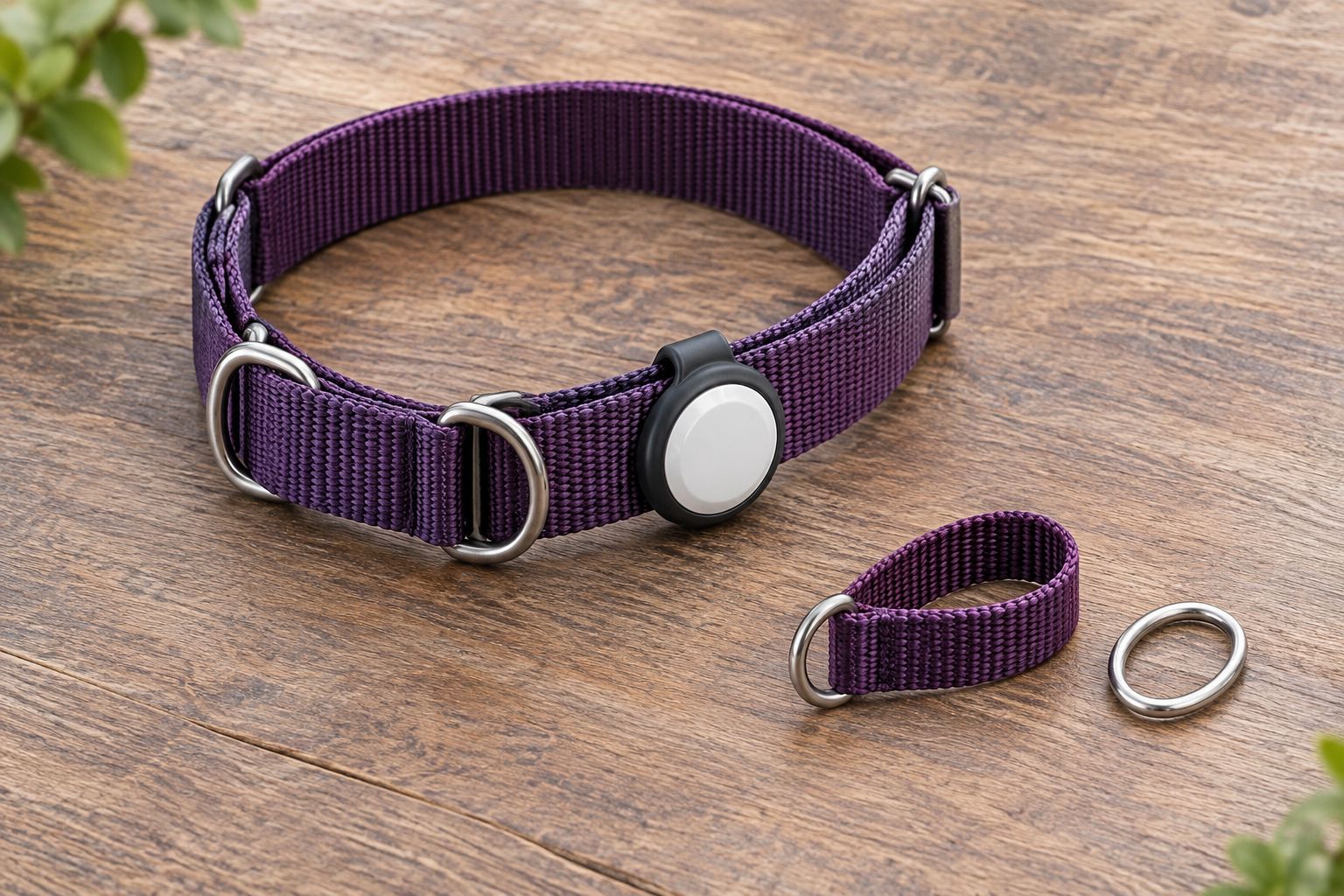
- Identify the broad band. Lay the collar flat and locate the main neck strap, the smaller control loop, the adjustment hardware, and the leash ring.
- Choose a clear section. Position the holder on the broad band, away from the adjustment slider and the points where the control loop moves through its hardware.
- Install the holder. Thread, wrap, or fasten it exactly as its instructions require. If it uses screws, follow the maker's tightening directions rather than guessing.
- Seat the AirTag fully. Check that the retaining lip, cover, or closure captures the tracker. A partially seated AirTag is not a finished installation.
- Inspect both sides. The outside should be secure, and the neck-facing side should have no exposed sharp edge, loose fastener, or hard corner pressing inward.
Expected result: The holder stays on the intended section of the broad band, the AirTag cannot readily pop out, and no attachment crosses or restricts the control loop.
Collar fit and movement checks
Adding a holder changes what rests against your dog's neck. Recheck the collar after installation, even if the collar fitted well before. A familiar strap setting is not a substitute for checking the finished assembly.
- Fit the collar using its maker's directions. Follow the instructions for your exact martingale design. Do not tighten the collar beyond its intended fit simply to stop a holder from rotating.
- Check the resting position. With the leash slack, make sure the collar relaxes and the holder does not pinch skin, trap fur, or press a hard edge into the neck.
- Apply gentle leash tension. Watch the control loop move. Confirm that the holder stays clear of the moving hardware and that the collar returns to its relaxed position when you release tension.
- Watch ordinary movement. Let your dog turn their head, lower their nose, and walk beside you. Stop if the holder catches, rubs, or causes persistent scratching or discomfort.
Expected result: The collar tightens and releases as designed, while the holder stays secure without bothering your dog. If the holder changes how the martingale works, remove it and choose a different mounting approach.
Complete 3 checks before leaving home: holder security, unobstructed loop movement, and comfortable fit. In 2026, as with any walking equipment, repeat those checks after adjusting the collar or moving the holder.
Do not leave a martingale on an unattended dog. Its loops and hardware can catch on objects. The convenience of keeping a tracker attached does not outweigh that risk.
Find My verification before a walk
A successful pairing indoors does not prove that every part of the setup is ready for use. Finish with 1 supervised walk in a familiar, secure setting, keeping your dog on leash throughout.
- Open the correct item. In Find My, tap Items, then select the collar's AirTag. Confirm that its name is easy to distinguish from your keys or bag.
- Read the location information. Look at both the mapped location and the displayed update information. Treat an older update as a last-known location, not a live position.
- Test sound away from your dog first. Use Play Sound while the tracker is off the collar or your dog is comfortably away from it. Avoid repeatedly sounding a device beside a sensitive dog's ears.
- Reinspect the attachment after walking. Check for shifted straps, loosened closures, rubbing, and dirt around the holder. Correct problems before the next outing.
Expected result: You can identify the right AirTag in Find My, understand whether its location is current, and confirm that the physical attachment remains secure after normal movement.
Apple AirTag is designed for locating belongings. Do not use an AirTag location check as permission to let your dog roam. For your 2026 walking routine, the leash and correctly fitted equipment remain the primary safeguards.
Move the AirTag when you change collars
You can move an already paired AirTag to another suitable holder without pairing it again. This is useful when you replace a worn collar or switch walking equipment, but it requires a fresh physical fit check.
- Remove the AirTag according to the holder's instructions, keeping small components together.
- Inspect the replacement collar's width, opening method, and control-loop layout. Do not assume the old holder fits.
- Install the AirTag on the replacement collar's broad band and repeat the fit and movement checks.
- Open Find My, choose Items, and verify the same AirTag with Play Sound before putting the assembly on your dog.
If the item name describes an old collar rather than your dog, update the name in Find My so it remains recognizable. Changing the holder does not change the AirTag's account ownership or how the Find My network locates it.
EverstockPets recommends choosing the replacement collar for your dog's fit first. Keep the collar that works safely; change the holder if the two do not fit together.
Troubleshooting
The setup card does not appear
Unlock your compatible iPhone or iPad, bring the AirTag nearby, and check Bluetooth and the required account settings. Move other unpaired AirTags away. If setup still fails, follow Apple's instructions for adding an AirTag through Find My and checking its battery.
Find My says the AirTag belongs to someone else
Ask the previous owner to remove the AirTag from their Apple Account. A physical reset does not clear that association. Do not keep attaching and removing the battery in an attempt to bypass ownership.
The holder will not slide onto the collar
Check whether the collar has an accessible strap end. A sewn, continuous design can prevent installation of a closed slide-on holder. Use a compatible attachment that installs around the broad band; do not cut stitching or force hardware through an undersized opening.
The holder slides or blocks the control loop
Remove it and compare its stated strap fit with the collar's actual width. Reposition only if a clear, secure mounting area exists. If the holder still travels into moving hardware, replace the holder rather than tightening the collar excessively.
The location looks stale or your dog dislikes the holder
A stale location reflects a tracking limitation, not necessarily a loose attachment: AirTag depends on nearby participating devices for remote updates. Physical discomfort is a separate problem. Remove the holder if your dog scratches persistently, develops irritation, or cannot move comfortably, and seek veterinary advice for skin injury.
Customize your workflow
Keep your tracking routine simple: inspect the holder before walking, check the displayed update time when using Find My, and remove the martingale when your dog is unattended. Keep ID information current even when the AirTag is working.
If collar pressure is a concern, review a properly fitted harness with your veterinarian or a qualified trainer. Moving a holder to another piece of equipment also requires permission from that equipment's instructions and a fresh check for rubbing, chewing access, and interference.
EverstockPets' pet-supply guidance helps you compare everyday equipment, but it does not replace individual fitting advice. The useful upgrade is the one that makes your existing routine safer and easier, not the one that adds the most accessories.
FAQ
How do I attach an AirTag to a martingale dog collar?
Pair the Apple AirTag in Find My, then secure a compatible holder to the collar's broad, non-tightening band. Keep it away from the control loop, adjustment hardware, and leash connection, and recheck fit before walking.
Can I hang an AirTag from the martingale's leash ring?
Do not choose the working leash ring as the default tracker attachment point. Hanging hardware can interfere with the control loop; follow the collar maker's accessory instructions and use a suitable broad-band attachment instead.
Does an AirTag track my dog live like GPS?
No, Apple AirTag is not a live GPS dog tracker. It uses the Find My network, so remote location updates depend on nearby participating Apple devices; always check the displayed update information.
Will any AirTag holder fit my martingale collar?
No, the holder must match the AirTag model, strap width, and collar construction. A closed slide-on holder also needs an accessible strap end, which some martingale designs do not provide.
Do I need to pair the AirTag again when I change collars?
No, moving an already paired AirTag to a new holder does not require pairing it again. Repeat the physical fit checks and confirm the same item in Find My before use.
Can my dog wear a martingale with an AirTag all day?
Do not leave a martingale collar on an unattended dog. Its loops and hardware can catch on objects, and adding a tracker does not remove that risk.
What should I do if my dog chews or swallows the AirTag?
Contact a veterinarian urgently if your dog swallows the AirTag, its battery, or holder components. Remove accessible loose parts and do not wait for symptoms before seeking help.
One last thing
Finding the collar is not the same as finding the dog. If a collar slips off, an AirTag can lead you to the detached equipment while your dog is elsewhere. For your 2026 setup, finish with the collar's fit—not the map—and keep your dog's microchip registration and visible ID details current.