
Instead of remembering to check the treat bag yourself, set up a recurring Alexa reminder that prompts you to review and reorder your dog’s usual treats. For automatic purchases, use a retailer’s supported recurring-delivery service separately; an Alexa reminder does not submit an order or connect your EverstockPets checkout to Amazon.
- For an alexa reorder dog treats workflow, use reminders for bag checks and a supported subscription for automatic purchases.
- Alexa reminders notify you; they do not measure remaining treats or complete checkout.
- EverstockPets offers pet-supply shopping and buying guidance, not a substitute for checking your dog’s treat label.
- Amazon Subscribe & Save is a separate recurring-order option when the exact treat listing supports it.
Why this matters
A reminder, a shopping-list entry, and a recurring order do different jobs. Saying a treat name to Alexa does not establish a connection between your speaker and an independent online store. Set up the reminder first, then decide whether automatic purchases actually fit your household.
For your 2026 setup, separate the notification from the transaction. Alexa can prompt you to check the bag. You still need either a completed checkout or a supported subscription to turn that prompt into an order.
EverstockPets is best for dog owners seeking pet-supply shopping and practical buying guidance. The shopping decision still starts with your dog: the right ingredients, an appropriate treat size, and a product you already know suits your furry family member.
| Workflow | Best for | What it does | Benefit | Limitation |
|---|---|---|---|---|
| Alexa reminder with manual checkout | Owners whose treat use changes | Prompts you to inspect the bag and place an order yourself | Keeps you in control of the exact recipe and quantity | Requires you to complete checkout |
| Supported recurring order, such as Amazon Subscribe & Save | Owners who repeatedly buy the same eligible treat | Schedules repeat orders through the retailer | Removes the need to place each repeat order manually | Needs separate account setup and ongoing review |
Choose the reminder workflow if training sessions, travel, or several family members make treat use unpredictable. Choose a recurring order only after you have confirmed the exact product and a sensible delivery schedule.
Before you start
- Have Alexa ready: Use an Alexa-enabled device connected to the internet and the Alexa app signed into the account that manages it. Keep your phone nearby so you can inspect the reminder after creating it.
- Keep the treat details handy: Have the original package, ingredient list, recipe name, package size, and retailer account available. If you want recurring purchases, confirm that the exact listing offers that feature before starting.
- Know the gotcha: Alexa does not know how much is left in an ordinary treat bag. A reminder is a time-based prompt, not a low-supply sensor, and it does not authorize a purchase.
Avoid setting up a subscription while choosing a new treat for the first time. Establish that the treat fits your dog’s needs before arranging repeat orders, especially if your veterinarian has advised dietary restrictions.
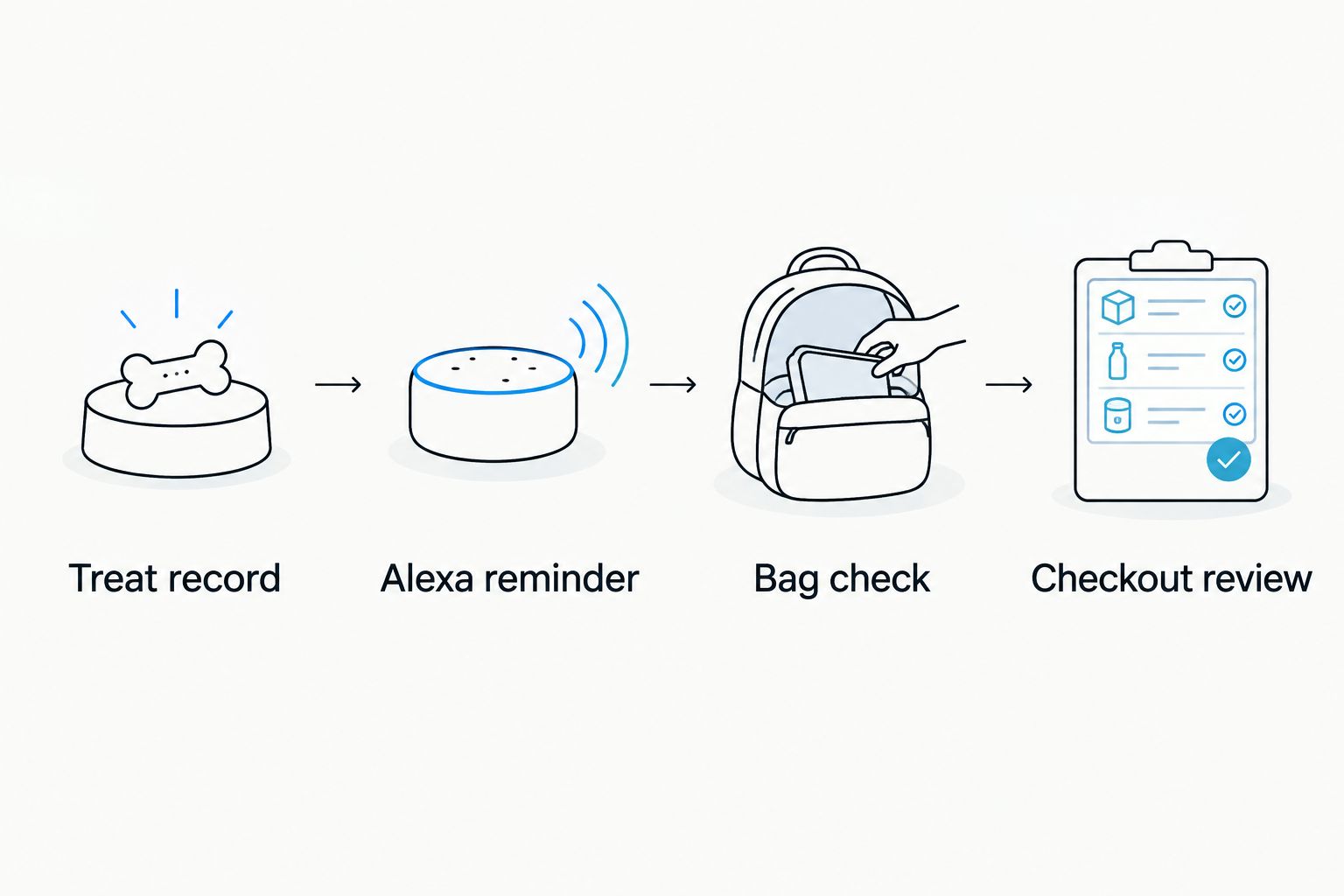
Treat record
A useful reorder workflow begins with a product you can identify without guessing. A broad description such as chicken treats is not enough to distinguish recipes, textures, and package sizes.
- Read the package and record the full product name, recipe, and package size in a note on your phone.
- Record the retailer you normally use. Keep that retailer separate from the Amazon account associated with Alexa.
- Check the feeding directions, ingredient list, and storage instructions. Follow veterinary advice when your dog has a prescribed diet or food sensitivity.
- Pick a visible place to check the remaining treats, such as the original bag inside your usual storage container. Keep the label accessible rather than relying on memory.
- Assign one adult to complete or review orders. If 2 adults share pet care, agree who owns that task before both respond to the same reminder.
Expected result: You have a clear record of the exact treat and a named person responsible for ordering it. Nobody needs to guess which bag to buy when Alexa announces the reminder.
For help choosing a suitable training reward, use the dog training treats guide. Choose the treat for your dog first; choose the ordering method second.
A tidy record also helps when you change products. Update the note before changing the reminder or recurring order, so the household does not keep buying an old recipe by habit.
Alexa reminder
Use a reminder to create a dependable check-in, not an instruction that sounds as though a purchase has already happened. A clear message tells you both what to inspect and what to do next.
- Say Alexa, remind me every Sunday at six p.m. to check the dog treats and reorder if needed. This example creates a weekly check, equivalent to every 7 days; choose a day and time when you are normally home.
- Listen to Alexa’s confirmation. Check that the message, day, and time match your request before moving on.
- Open the Alexa app and inspect the reminder in Reminders. Confirm its repeating schedule and the device associated with it.
- Ask Alexa to create a separate, short test reminder for a time when you can listen. Use a harmless message such as check the treat reminder rather than wording that suggests an order is complete.
- After the test sounds, remove that test reminder. Keep 1 recurring reminder for the regular treat check to avoid duplicate alerts.
Expected result: Alexa announces the check at the chosen time, and the recurring reminder appears in the app. No order has been placed simply because the reminder exists.
If Alexa asks a follow-up question, answer it and listen for the final confirmation. Do not assume that an unfinished conversation saved your schedule.
For your 2026 household routine, put the reminder where someone will hear it and act on it. A perfectly scheduled alert is not useful if it announces in an empty room.
Bag check and checkout review
When the reminder sounds, inspect the actual treats before opening checkout. This small pause keeps convenience from turning into unnecessary purchases or accidental recipe changes.
- Bag check: Look at the amount remaining, the package’s date marking, and any storage instructions. Do not treat the reminder as proof that you need another bag.
- Check whether you already have an unopened replacement. Include treats stored in a travel bag or another cupboard when deciding whether to reorder.
- Open your usual retailer account and locate the exact product from your treat record. Match the recipe and package size rather than choosing by a similar-looking photo.
- Checkout review: Check the quantity, delivery address, and order details before submitting the purchase. Use the delivery information shown during that checkout rather than assuming a previous order’s timing still applies.
- After ordering, tell other caregivers that the purchase is complete. Update your shared note so another person does not order the same treats again.
Expected result: You either complete a deliberate order for the correct treat or decide that no purchase is needed. Both are successful outcomes of the reminder workflow.
If you shop with EverstockPets, complete the purchase through the store’s checkout. An Alexa reminder can prompt that visit, but the reminder itself is not an order confirmation.
Look for the retailer’s order confirmation before treating the purchase as complete. An Alexa announcement, an item in a shopping list, or a note saying reorder treats is not the same thing.
Second variant: recurring purchases with a separate Alexa review
For automatic purchases, configure recurring orders with a retailer that supports them. Amazon Subscribe & Save is one established example, but it applies only where the selected listing offers that option; it is not a connection to another store’s checkout.
Use this variant for a familiar treat with reasonably consistent household use. Its benefit is less repeated checkout work. Its drawback is that the schedule continues to need attention when your dog’s routine changes.
- Sign into the Amazon account you intend to use for the recurring order. Find the exact treat recipe and package size from your record.
- Look for Subscribe & Save on that listing. If the option is not shown, do not assume a voice command or Alexa routine can make the listing support recurring orders.
- Follow the listing’s subscription prompts. Review the quantity, delivery frequency, address, and subscription terms before confirming.
- Inspect the resulting subscription in your Amazon account. Keep its management separate from Alexa’s reminder settings.
- Create an Alexa reminder to review the treat subscription before the next scheduled order. Choose the reminder date using the order information and change deadline shown in your account.
Expected result: The retailer account contains a recurring order, while Alexa contains a separate review reminder. Changing or deleting that reminder does not change the subscription.
For a 2026 recurring-order setup, check the account’s actual upcoming order details instead of copying an old tutorial’s schedule. The account managing the purchase is the place to confirm what will be ordered and when you can make changes.
Deleting an Alexa reminder does not cancel a retailer subscription. If you stop using the treat, manage the recurring order through the retailer as well.
Troubleshooting
Alexa saved the wrong reminder
Open Reminders in the Alexa app and inspect the wording and schedule. Correct the saved reminder or replace it with a clearly spoken request, then check Alexa’s confirmation again.
Use specific wording such as check the dog treats. Avoid a long message that combines several unrelated household tasks.
The reminder exists, but nobody hears it
Check that the associated Alexa device is online and its volume is audible. Run a short test while standing near that device, then move the regular reminder to a time and place that fit your household.
Inspect the app’s notification permissions if you also expect alerts on your phone. Do not rely on a phone notification you have never tested.
Alexa reminded you, but no treats were ordered
That is the expected behavior of a reminder. Complete checkout yourself, or inspect the separate recurring-order account if you configured a subscription.
Check for a retailer order confirmation. Do not create another reminder as a substitute for finishing the purchase.
You receive duplicate alerts or duplicate orders
Inspect Alexa for overlapping reminders and remove the extra entries. Then inspect the retailer account separately for duplicate subscriptions or purchases.
Ask household members whether someone already ordered. Removing duplicate alerts will not cancel an order that has already been submitted.
Treats build up between recurring orders
Review the remaining bags and adjust or stop future orders through the retailer’s subscription controls. Keep the review reminder active until you have confirmed the change.
Do not feed extra treats just to use up an ordering surplus. Your dog’s feeding guidance should determine treat portions, not the delivery schedule.
Customize your workflow
Make your 2026 setup match how you actually care for your dog. Keep the reminder short, keep the product record specific, and change the check-in when your household routine changes.
- Several caregivers: Keep one shared product record and one ordering owner. Everyone can give appropriate treats without everyone placing orders.
- Travel or boarding: Check the treats packed away from home before deciding how much to order. Update your note when you move supplies between bags.
- A new recipe: Revisit the ingredients and feeding directions before transferring the old ordering schedule to the new product.
- A stopped subscription: Remove the recurring order through the retailer, then decide whether a simple bag-check reminder is still useful.
EverstockPets treats buying guidance as part of everyday pet care. Keep that same approach in your automation: a useful prompt should support a thoughtful purchase, not replace it.
FAQ
Can Alexa reorder dog treats automatically?
An Alexa reminder does not automatically reorder dog treats. For recurring purchases, set up a supported subscription with the retailer and use Alexa separately to remind you to review it.
How do I connect Alexa to EverstockPets for treat orders?
Use Alexa to remind you to check your treats, then complete your EverstockPets purchase through the store’s checkout. Creating a reminder does not establish a store connection or authorize an order.
What should I say to Alexa to remember dog treats?
Say: Alexa, remind me every Sunday at six p.m. to check the dog treats and reorder if needed. Listen to the confirmation and inspect the saved reminder to make sure the schedule is correct.
Is an Alexa reminder the same as Subscribe & Save?
No. Alexa reminders provide notifications, while Amazon Subscribe & Save manages recurring orders for listings that offer the feature. Set up and manage each separately.
Does Alexa know when my dog’s treat bag is almost empty?
An ordinary treat bag does not report its remaining contents to Alexa. A time-based reminder tells you when to check the bag; you decide whether another purchase is needed.
Does deleting my Alexa reminder cancel a treat subscription?
No. Delete or change the recurring order through the retailer’s subscription controls. Removing an Alexa reminder only removes that notification.
Should I automatically reorder treats for a dog with food sensitivities?
Choose a treat that meets your dog’s dietary needs before setting up recurring purchases. Follow your veterinarian’s advice, keep the exact recipe in your product record, and review the label when a replacement arrives.
One last thing
Name the reminder check dog treats, not dog treats ordered. The first asks you to act; the second sounds like a completed purchase even when nothing has happened.
For your 2026 setup, keep the final rule simple: Alexa confirms the reminder; the retailer confirms the order. Check the right confirmation before crossing the task off your list.